How to make a wedding guest list (free template)
Free wedding guest list template for Excel or Google Sheets with RSVP, meal and table columns, plus a step-by-step way to build and cut your guest list.

In short
- Start with a budget and a venue capacity, then work out how many guests you can host before you write any names.
- List everyone in tiers: must-invite family and friends first, then the people you would like to invite if space allows.
- Track each guest in one spreadsheet: name, group, address, invitation sent, RSVP, meal, table and notes.
- The average US wedding had 117 guests in 2025, according to The Knot's Real Weddings Study; yours should match your budget and room, not the average.
The guest list drives almost every other wedding decision: the venue, the budget, the number of tables, and in the end the seating chart. Build it once, in one place, and keep it up to date until the last RSVP.
Free guest list template
Download the Excel template (.xlsx) CSV for Google Sheets or Numbers
The template has one row per guest and these columns: First name, Last name, Group, Side, Mailing address, Email or phone, Invitation sent, RSVP, Meal, Table, Notes. RSVP and Invitation sent have drop-down lists, and a second sheet counts guests, invitations sent, yes, no and pending answers as you fill it in. It works in Excel, Google Sheets, Numbers and LibreOffice.
How to build the list, step by step
- Set the number first. Take your budget and the venue’s seated capacity and decide on a maximum. For reference, The Knot’s Real Weddings Study found an average of 117 guests for US weddings in 2025, but averages vary by region and hometown weddings are larger than destination weddings.
- Split the number between you and, if they are paying or hosting, your families. Agree on the split before anyone writes names.
- Write the A-list: immediate family, close relatives, closest friends, and anyone you would be upset not to see.
- Write the B-list: people you would like to invite if space allows. Rank it, so you know who to add when early answers come back “no”.
- Decide your rules once: plus-ones, children, coworkers. Apply them to everyone; it is easier to explain a rule than an exception.
- Fill in the details: one row per person (not per household), the group they belong to (Lopez family, college friends, work) and mailing addresses.
- Track RSVPs in the same sheet: invitation sent, RSVP, meal choice and notes such as allergies or accessibility needs.
Working out what the number costs
Most of a wedding budget scales with the number of guests: food, drinks, rentals, tables, invitations, favors. Ask your caterer and venue for a per-guest price that includes service and rentals, then work backwards. An example with made-up but round numbers:
| Amount | |
|---|---|
| Total budget | $30,000 |
| Fixed costs that do not depend on guests (venue hire, photographer, attire, music) | $13,500 |
| Left for per-guest costs | $16,500 |
| Per-guest price from the caterer, including rentals and service | $120 |
| Guests you can afford: 16,500 ÷ 120 | 137 |
Then compare it with the venue’s seated capacity. The lower of the two numbers is your maximum. Every guest you add after that has to come from somewhere else in the budget.
Plan as if everyone says yes
It is tempting to invite more people than the venue holds and count on some declines. Don’t. Some guests always decline, but you cannot know how many in advance, and a venue cannot hold more people than its capacity on the day. If you want to invite more people as the answers come in, use the ranked B-list: send those invitations only when “no” answers free up places, and keep them early enough that they do not look like an afterthought.
Rules that make cutting easier
When the list is too long, rules are easier to defend than individual choices:
- The one-year rule: if neither of you has spoken to them in a year, they are on the B-list.
- No plus-ones for single guests unless they are in a long-term relationship, or only for guests who will not know anyone else.
- Adults only, or immediate family’s children only.
- Coworkers: all of the team or none of it.
- Parents’ friends: a fixed number of places for each set of parents, which they fill.
Whatever you choose, apply it to both sides and write it down, so the answer is the same whoever asks.
Rows per person, households for addresses
Keep one row per person, so you can track each RSVP and meal. Invitations, though, go to households. Add a household name in the Group or Notes column (“Patel household”) and write the mailing address on the first row of each household only, or filter by household when you address envelopes. Counting rows then gives you the number of guests, and counting households gives you the number of invitations to print.
Use groups from day one
The Group column pays off at seating time. People in the same group are usually seated together, and the seating chart maker uses this column to keep families and friend groups at one table automatically.
From guest list to seating chart
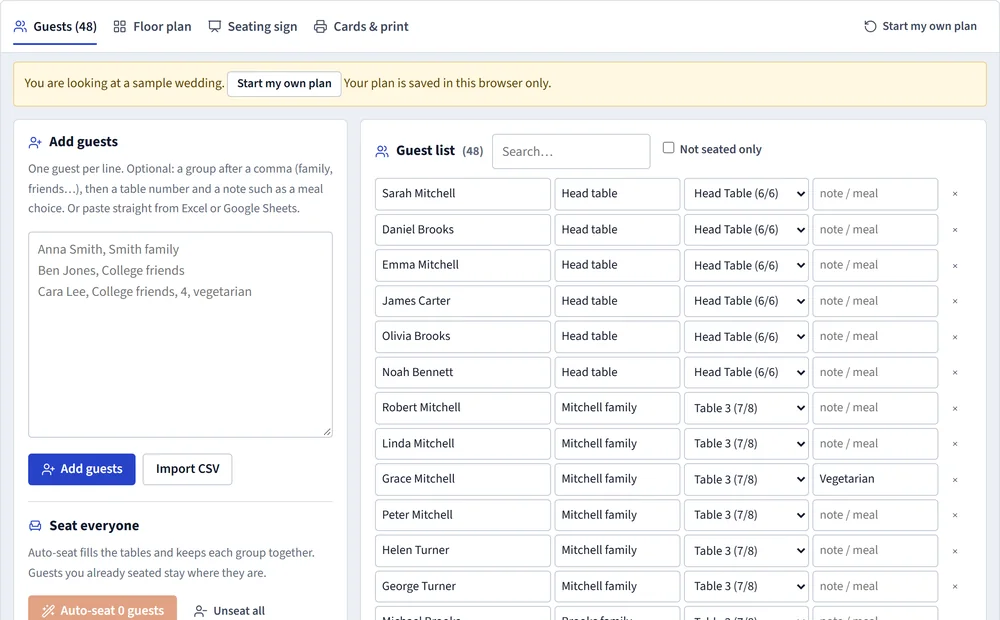
When RSVPs close:
- In the template, filter the RSVP column to Yes.
- Copy the rows, including the header row.
- Paste them into the seating chart maker. It recognizes the First name, Last name, Group, Meal and Table columns.
- Set up your tables and press Auto-seat: groups are kept together and you fine-tune by hand.
The meal column prints on the plan for your caterer, and the same names become your seating sign, table numbers and place cards. For the order of invitations and RSVP dates, see when to send wedding invitations.
Frequently asked questions
How many people should I invite to my wedding?
Start from your budget and venue: divide what you can spend on catering and rentals by the cost per guest, and check the venue's seated capacity. Then fit the list to that number.
Should I invite more people than the venue holds, expecting some to decline?
Only with care. Some invited guests always decline, but the share varies a lot, especially for local weddings. Never invite more people than you could actually seat if everyone said yes.
How do I handle plus-ones?
Set one rule and apply it to everyone, for example plus-ones for married, engaged or long-term partners, and for guests who would otherwise know nobody. Put the partner's name on the list as soon as you know it.
Can I use the template in Google Sheets?
Yes. Upload the .xlsx file to Google Drive and open it with Google Sheets, or import the .csv file. The drop-down lists and the counts sheet work in both.
Sources
- The Knot Real Weddings Study, The Knot
- This is the average wedding guest list size in the US, The Knot
- Wedding seating chart etiquette, The Knot
Photos are AI-generated illustrations; diagrams and tool screenshots are made from the PlanPrint tools. Something out of date or wrong? Tell us and we will correct it.